Data Fetching in Next.js
Introduction:
Building dynamic and interactive online apps requires a strong understanding of data fetching. Managing data fetching properly is important for developing quick and responsive user interfaces with the Next.js React framework. We can look over managing data on the client and server, implementing error handling and loading states, creating API queries with Axios or Fetch, and other parts of data fetching with Next.js.
Making API Requests with Axios or Fetch:
Fetching Data with Fetch:
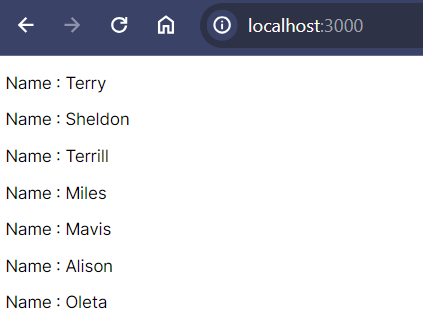
Next.js supports both client-side and server-side data fetching. For client-side fetching, the built-in fetch API is a common choice. Let’s take a look at a simple example:
"use client"
import React, { useState, useEffect } from 'react'
const FetchApiCall = () => {
const [data, setData] = useState([]);
useEffect(() => {
const fetchData = async () => {
try {
const response = await fetch("https://dummyjson.com/users")
const result = await response.json();
setData(result.users);
} catch (error) {
console.error(error.message);
}
};
fetchData();
}, [])
return (
<div>
{
data.map((item) => (
<p key={item.id}>Name : {item.firstName}</p>
))
}
</div>
)
}
export default FetchApiCall;Code language: HTML, XML (xml)Output :
Fetching Data with Axios:
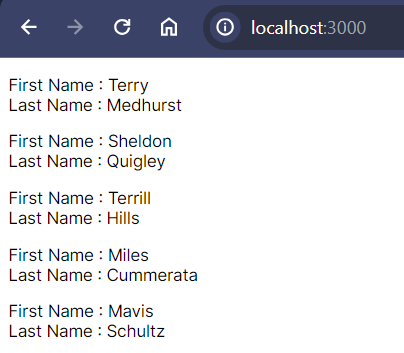
Axios is a popular HTTP client for making API requests. To use Axios in a Next.js project, you need to install it first:
npm install axiosCode language: Bash (bash)Now, you can use Axios for data fetching:
"use client"

import axios from 'axios';
import { useEffect, useState } from 'react';

const AxiosFetchingData = () => {
    const [data, setData] = useState([]);

    useEffect(() => {
        const fetchingData = async () => {
            try {
                const responce = await axios.get("https://dummyjson.com/users");
                setData(responce.data.users);
            } catch (error) {
                console.error(error.message);
            }
        }
        fetchingData();
    }, [])

    return (
        <div>
            {
                data.map((item) => (
                    <>
                        <p>
                            First Name : {item.firstName}<br/>
                            Last Name : {item.lastName}
                        </p>
                    </>
                ))
            }
        </div>
    )
}

export default AxiosFetchingData;Code language: HTML, XML (xml)
Output :
Handling Data on the Client and Server (Page Routing):
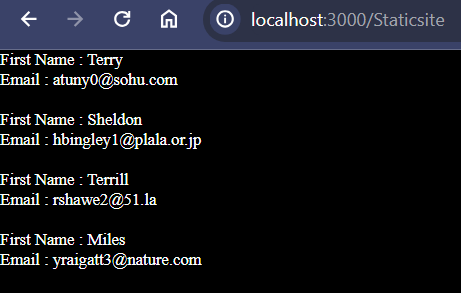
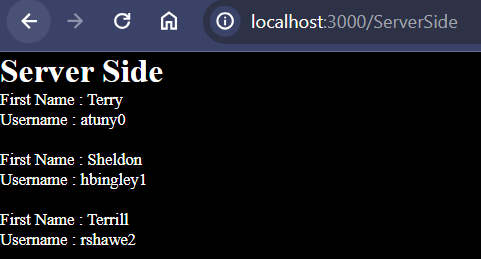
Next.js provides two methods for fetching data: getStaticProps for static site generation and getServerSideProps for server-side rendering. Let’s explore both:
Static Site Generation:
import React from 'react'

const Staticsite = ({ result }) => {
    console.log("result : ", result)
    const data = result.users;

    return (
        <div>
            {
                data.map((item) => (
                    <div>
                        <p>
                           First Name : {item.firstName} <br />
                           Email : {item.email}
                         </p><br />
                    </div>
                ))
            }
        </div>
    )
}

export async function getStaticProps() {
    const response = await fetch("https://dummyjson.com/users")
    const result = await response.json();
    // console.log("RES : ", result)
    return {
        props: {
            result,
        }
    }
}

export default Staticsite;Code language: JavaScript (javascript)
Output :
Server-Side Rendering:
import react from "react";

export default function ServerSide({ result }) {
    const data = result.users;
    return (
        <div>
            <h1>Server Side</h1>
            {
                data.map((item) => (
                    <div>
                        <p>First Name : {item.firstName} <br/> Username : {item.username}</p><br/>
                    </div>
                ))
            }
        </div>
    )
}

export async function getServerSideProps() {
    const response = await fetch("https://dummyjson.com/users");
    const result = await response.json();

    return {
        props: {
            result,
        }
    }
} Code language: JavaScript (javascript)
Output :
Error Handling and Loading States:
It’s critical to handle errors politely and provide a loading state when dealing with asynchronous operations. Here’s how you can enhance the examples with error handling and loading states:
// pages/index.js
import React, { useState, useEffect } from 'react';
import axios from 'axios';

const Home = () => {
  const [data, setData] = useState(null);
  const [loading, setLoading] = useState(true);
  const [error, setError] = useState(null);

  useEffect(() => {
    const fetchData = async () => {
      try {
        const response = await axios.get('https://api.example.com/data');
        setData(response.data);
      } catch (error) {
        console.error('Error fetching data:', error);
        setError('An error occurred while fetching data.');
      } finally {
        setLoading(false);
      }
    };

    fetchData();
  }, []);

  return (
    <div>
      {loading && <p>Loading...</p>}
      {error && <p style={{ color: 'red' }}>{error}</p>}
      {data && (
        <div>
          {/* Render data */}
          <p>{data.message}</p>
        </div>
      )}
    </div>
  );
};

export default Home;
Code language: JavaScript (javascript)
In this example, the loading state is used to display a loading message while data is being fetched. If an error occurs, the error state is set, and an error message is displayed. If the data is successfully retrieved, it is rendered to the component.
Conclusion
Making API queries using Axios or Fetch, processing data on the client and server, or providing error handling and loading states are all possible with Next.js. By leveraging features like getStaticProps and getServerSideProps, you can optimize your application for performance and user experience. With the examples given, you should be able to handle data fetching in Next.js applications with ease.
Related posts:

Powered by YARPP.