CSS – color
Certainly! Colors in CSS allow you to add visual appeal and personality to your web designs. CSS offers various ways to specify colors, including named colors, hexadecimal color codes, RGB values, and HSL values.
- Named Colors: CSS provides a set of 147 named colors that you can use. These include common color names like “red,” “blue,” and “green.” For example, to set text color to red, you can use
color: red;. - Hexadecimal Color Codes: Hexadecimal color codes are widely used. They are represented by a hash symbol (#) followed by six characters, where each pair of characters defines the intensity of red, green, and blue (RGB) in the color. For instance,
color: #FF5733;sets the text color to a shade of red. - RGB Values: RGB stands for Red, Green, Blue. You can specify colors by specifying the amount of red, green, and blue in a color using the
rgb()function. For example,color: rgb(255, 87, 51);creates a similar red shade. - HSL Values: HSL stands for Hue, Saturation, Lightness. It’s another way to represent colors, which allows you to manipulate the color more intuitively. For example,
background-color: hsl(210, 100%, 50%);sets the background color to a shade of blue. - RGBA and HSLA: These are variations of RGB and HSL that include an alpha channel to control the transparency of a color. For example,
background-color: rgba(255, 0, 0, 0.5);sets a semi-transparent red background. - Linear Gradients: CSS allows you to create smooth color transitions using linear gradients. For instance, you can create a gradient background that smoothly transitions from one color to another.
- Color Keywords: Apart from named colors, there are other color keywords like “transparent” and “currentColor” that are handy in specific situations.
Using colors effectively in your CSS helps in creating visually appealing and user-friendly web designs. You can use them for text, backgrounds, borders, and more to give your website a unique and attractive look.
Example: Styling Text with Different Colors
Suppose you have a simple HTML document with three paragraphs, and you want to style each paragraph’s text with a different color using CSS.
Here’s your HTML structure:
<!DOCTYPE html>
<html>
<head>
<title>Color Example</title>
<link rel="stylesheet" type="text/css" href="styles.css">
</head>
<body>
<div class="container">
<p class="red-text">This is a red paragraph.</p>
<p class="green-text">This is a green paragraph.</p>
<p class="blue-text">This is a blue paragraph.</p>
<p class="yellow-text">This is a yellow paragraph.</p>
<p class="pink-text">This is a yellow paragraph.</p>p>
</div>
</body>
</html>
Code language: HTML, XML (xml)Now, let’s create an external CSS file, “styles.css,” to style these paragraphs with different colors:
  /* styles.css */
    .red-text {
        color: red;
    }

    .green-text {
        color: #00cc00;
        /* Hexadecimal color code for green. */
    }

    .blue-text {
        color: rgb(0, 0, 255);
        /* RGB color for blue. */
    }
    .yellow-text {
        color: rgba(255, 255, 0, 1);
    }
    .pink-text {
        /* Linear gradient from top to bottom */
        width: 200px;
        background: linear-gradient(to bottom, #FFC0CB, #FF1493);

    }Code language: CSS (css)
Output :
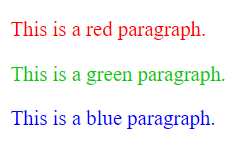
In this example:
- We have three paragraphs with different classes:
.red-text,.green-text, and.blue-text. - In the external CSS file, we use the
colorproperty to specify the text color for each class. We’ve used three different methods to specify colors:.red-textis set to “red” using a named color..green-textuses a hexadecimal color code (#00cc00) for green..blue-textuses RGB values (rgb(0, 0, 255)) to represent blue.
By linking the external CSS file to our HTML document, the paragraphs will be styled accordingly:
- The first paragraph will have red text.
- The second paragraph will have green text.
- The third paragraph will have blue text.
This example demonstrates how you can use CSS to apply various colors to different elements on your webpage, adding visual interest and enhancing the overall design. CSS gives you the flexibility to choose colors in different formats, making it a powerful tool for web design.
