Events: change, input, cut, copy, paste
JavaScript is a versatile scripting language that plays a crucial role in making web applications interactive and user-friendly. One of the ways it achieves this is through handling various events, including those related to user input. In this blog post, we’ll explore some essential events: change, input, cut, copy, and paste. We’ll learn how they can be used to enhance user experiences and add functionality to web forms and content editing.
The Change Event
The change event is triggered when the value of an input element, such as a text input or a select dropdown, is changed by the user. This event is commonly used in forms to detect when users have made a selection or modified an input field.
Example:
<input type="text" id="name" placeholder="Enter your name">
<p id="result"></p>
<script>
const nameInput = document.getElementById('name');
const result = document.getElementById('result');
nameInput.addEventListener('change', function () {
result.textContent = `You entered: ${nameInput.value}`;
});
</script>Code language: HTML, XML (xml)Output :
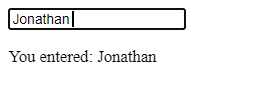
In this example, when the user enters their name and then clicks outside the input field, the change event is triggered, and the entered name is displayed in a paragraph below the input field.
The Input Event
The input event, on the other hand, is fired every time the value of an input element changes, even if it’s a single character addition or deletion. It provides real-time feedback as the user interacts with the input field.
Example:
<input type="text" id="search" placeholder="Search">
<p id="search-results"></p>

<script>
  const searchInput = document.getElementById('search');
  const searchResults = document.getElementById('search-results');

  searchInput.addEventListener('input', function () {
    const query = searchInput.value.trim();
    searchResults.textContent = `Searching for: ${query}`;
  });
</script>Code language: JavaScript (javascript)
Ouput :

In this example, as the user types into the search input field, the input event continuously updates the search results paragraph to display the search query in real-time.
The Cut, Copy, and Paste Events
The cut, copy, and paste events are triggered when a user performs these clipboard operations in an input field or a content-editable area. These events allow developers to control and modify the clipboard data before or after these actions occur.
Example:
<textarea id="editable" placeholder="Try cutting, copying, or pasting text here"></textarea>

<script>
  const editable = document.getElementById('editable');

  editable.addEventListener('cut', function (event) {
    const selectedText = window.getSelection().toString();
    event.clipboardData.setData('text/plain', `You cut: ${selectedText}`);
  });

  editable.addEventListener('copy', function (event) {
    const selectedText = window.getSelection().toString();
    event.clipboardData.setData('text/plain', `You copied: ${selectedText}`);
  });

  editable.addEventListener('paste', function (event) {
    const clipboardData = event.clipboardData.getData('text/plain');
    event.preventDefault();
    editable.value += `You pasted: ${clipboardData}`;
  });
</script>Code language: HTML, XML (xml)
Output :
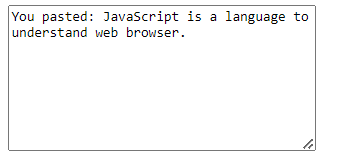
In this example, you can experiment with cutting, copying, and pasting text within the textarea. The corresponding events handle these actions and modify the clipboard data or prevent default behavior (in the case of paste) to customize the user experience.
Enhancing User Experiences with Events
Understanding and utilizing events like change, input, cut, copy, and paste can greatly enhance the user experience of your web applications. These events provide real-time feedback, improve data handling, and enable you to add custom functionality to user interactions.
Whether you’re building forms that need dynamic validation, creating content-editable areas for rich text manipulation, or simply looking to make your web app more responsive, these JavaScript events are powerful tools in your development arsenal. They empower you to create engaging and user-friendly web experiences.
In conclusion, JavaScript events are a fundamental aspect of web development, enabling developers to respond to user actions and create interactive web applications. The change, input, cut, copy, and paste events, as demonstrated in this blog post, are just a few examples of how JavaScript can be used to enhance user experiences and add functionality to your web projects.
Related posts:

Powered by YARPP.