Forms and Controlled Components
Forms are an integral part of many web applications, allowing users to input data and interact with the application. In React, managing form inputs and ensuring their synchronization with the component’s state is crucial.
The Importance of Forms
Forms serve as a bridge between users and web applications, enabling them to provide input, submit data, and trigger actions. In React, managing forms involves dealing with various input elements like text fields, checkboxes, radio buttons, and select elements. Here, we will focus on text inputs, but the principles discussed apply to other input types as well.
Basic Form Structure
To create a form in React, you typically start with a <form> element and include one or more input elements within it. Here’s a basic example of a form with a text input:
import React, { useState } from 'react';
function MyForm() {
const [inputValue, setInputValue] = useState('');
const handleInputChange = (event) => {
setInputValue(event.target.value);
};
const handleSubmit = (event) => {
event.preventDefault();
// Process the form data
};
return (
<>
<h1>React Form</h1>
<form onSubmit={handleSubmit}>
<input
type="text"
value={inputValue}
onChange={handleInputChange}
placeholder='Enter The Name'
/><br></br>
<input
type="text"
value={inputValue}
onChange={handleInputChange}
placeholder='Enter The Gender'
/><br></br>
<input
type="text"
value={inputValue}
onChange={handleInputChange}
placeholder='Enter The Email'
/><br/>
<button type="submit">Submit</button>
</form>
</>
);
}
export default MyForm;
Code language: HTML, XML (xml)Output :
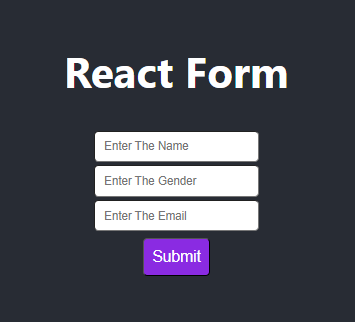
In this functional component, we use the useState hook to initialize and manage the inputValue state. The handleInputChange and handleSubmit functions remain almost the same as in the class component, and they are used to handle input changes and form submissions.
Implementing Controlled Components
Controlled components are a core concept in React when it comes to handling form inputs. A controlled component is an input element whose value is controlled by the state of a React component. This means that the component’s state and the input’s value are in sync, ensuring a single source of truth.
Key Concepts
To implement a controlled component, you need to follow these key concepts:
- Initialize State: Set up the initial state for the form inputs. This is typically done in the component’s constructor or using the
useStatehook in functional components. - Value Prop: Assign the
valueprop of the input element to the corresponding state property. This connects the input element to the component’s state. - Change Handler: Implement a change handler function that updates the state whenever the input value changes.
- Form Submission: Handle form submission and process the form data in the
onSubmithandler.
Example of a Controlled Input
Let’s take a closer look at the example provided earlier. In this component, the input element is a controlled component. The value prop of the input is set to inputValue, which is the component’s state property that holds the input’s value.
 <input
   type="text"
   value={inputValue}
   onChange={handleInputChange}
 />Code language: HTML, XML (xml)
The onChange event handler, handleInputChange, is responsible for updating the component’s state whenever the user types into the input field.
 const handleInputChange = (event) => {
        setInputValue(event.target.value);
 };Code language: HTML, XML (xml)
By connecting the input’s value prop to the component’s state and providing an onChange handler, we ensure that the input is a controlled component. Any change in the input field will trigger the handleInputChange function, which updates the component’s state, keeping the input and state synchronized.
Common Use Cases and Features
Now that you understand the fundamentals of controlled components, let’s explore some common use cases and features when working with forms in React.
Handling Multiple Inputs
Forms often consist of multiple input elements. To handle this scenario, you can create a controlled component for each input and manage their values individually in the component’s state.
import React, { useState } from 'react'

const Form1 = () => {
    const [userName,setUserName] = useState('');
    const [password,setpassword] = useState('');

    const handleUsernameChange = (e) =>{
        setUserName(e.target.value)
    }
    const handlePasswordChange = (e) =>{
        setpassword(e.target.value);
    }
    return (
        <div>
            <form>
                <input
                    type="text"
                    value={userName}
                    onChange={handleUsernameChange}
                />
                <input
                    type="password"
                    value={password}
                    onChange={handlePasswordChange}
                />
            </form>

        </div>
    )
}

export default Form1;Code language: HTML, XML (xml)
Select Elements
For select elements, you can use the same controlled component approach. Set the value prop of the <select> element and use the onChange handler to update the state.
<select value={selectedOption} onChange={handleSelectChange}>
  <option value="option1">Option 1</option>
  <option value="option2">Option 2</option>
  <option value="option3">Option 3</option>
</select>Code language: HTML, XML (xml)
Checkboxes and Radio Buttons
Checkbox and radio button input elements can also be controlled components. Use the checked prop for checkboxes and the value and checked props for radio buttons.
<input
  type="checkbox"
  checked={isChecked}
  onChange={handleCheckboxChange}
/>

<input
  type="radio"
  value="option1"
  checked={selectedOption === "option1"}
  onChange={handleRadioChange}
/>Code language: HTML, XML (xml)
Form Validation
You can implement form validation by checking the state of the controlled components and displaying error messages accordingly. For example, you can add a conditional rendering of error messages based on the state.
{isError && <p className="error">Invalid input</p>}Code language: JavaScript (javascript)Conditional Submit
In some cases, you may want to disable the submit button until the form meets certain criteria. You can use the component’s state to manage the button’s disabled attribute.
<button type="submit" disabled={isValid()}>Submit</button>Code language: HTML, XML (xml)Conclusion
In React, handling forms and implementing controlled components is a fundamental skill for building interactive and user-friendly web applications. By understanding the concept of controlled components and following the key principles, you can create forms that are easy to manage and maintain.
Remember that forms come in various shapes and sizes, and React provides the flexibility to adapt to different requirements. Whether you’re building a simple login form or a complex data entry interface, the principles of controlled components remain consistent, allowing you to create responsive and efficient forms that enhance the user experience.
