HTML – Marquees
In HTML, the <marquee> element is used to create a scrolling or moving text or image effect within a web page. It allows you to add dynamic and eye-catching visual elements to your website. However, it’s important to note that the <marquee> element is considered obsolete in modern web development due to accessibility and usability concerns. Nevertheless, here’s an explanation of how it works:
<marquee>Element: The<marquee>element is a self-contained tag that does not require a closing tag. It is used to create scrolling text or images within a specified area on a web page.directionAttribute: This attribute specifies the direction in which the content should scroll. You can set it to values like “left” (default), “right,” “up,” or “down” to control the scrolling direction.behaviorAttribute: Thebehaviorattribute determines how the scrolling content behaves. Common values include:- “scroll” (default): The content continuously scrolls in the specified direction.
- “slide”: The content scrolls once and stops at the end.
- “alternate”: The content scrolls back and forth, reversing direction when it reaches the end.
scrollamountAttribute: This attribute controls the speed or rate of scrolling. You can set it to a numeric value to adjust the scrolling speed. A higher value results in faster scrolling.scrolldelayAttribute: Thescrolldelayattribute sets the delay in milliseconds before the scrolling starts. It determines how long the content remains stationary before scrolling begins.widthandheightAttributes: These attributes define the dimensions (width and height) of the marquee element’s containing box. You can set them in pixels or as a percentage of the parent container.loopAttribute: Theloopattribute specifies the number of times the content should loop. You can set it to a numeric value or use “-1” for continuous looping.bgcolorAttribute: Thebgcolorattribute sets the background color of the marquee element.hspaceandvspaceAttributes: These attributes control the horizontal and vertical spacing around the marquee element.alignAttribute: Thealignattribute determines the alignment of the marquee element within its containing box. Common values include “left,” “center,” and “right.”onmouseoverandonmouseoutAttributes: These attributes allow you to specify JavaScript functions to run when the user’s mouse pointer enters or leaves the marquee element.
Here’s a simple example of a scrolling text using the <marquee> element:
<!DOCTYPE html>
<html>
<head>
<title>Marquee Example</title>
</head>
<body>
<h1>Breaking News:</h1>
<marquee direction="left" behavior="scroll" scrollamount="2">Lorem ipsum dolor sit amet, consectetur adipiscing elit.</marquee>
</body>
</html>Code language: HTML, XML (xml)Output :
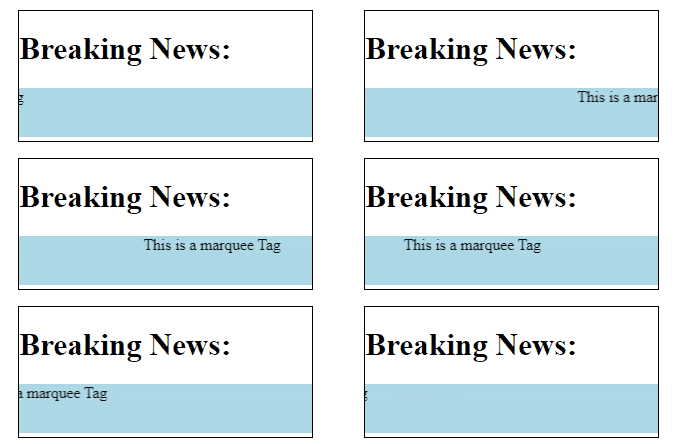
In this example, a <marquee> element is created with various attributes to control its appearance and behavior. The text “Scrolling Text” will scroll horizontally from right to left, with a delay of 200 milliseconds before scrolling starts. It will loop three times and have a light blue background with spacing around it. The alignment is set to the center.
While the <marquee> element can add visual interest to a web page, it’s no longer recommended for use in modern web design due to its impact on accessibility and usability. Alternative methods using CSS animations or JavaScript are preferred for achieving similar effects while maintaining web standards and accessibility.
