JavaScript – For Loop
In the world of JavaScript programming, the “for loop” is a powerful and versatile tool for creating iterative processes. It allows you to execute a specific block of code repeatedly for a defined number of times or until a certain condition is met. Let’s explore the concept of for loops in a way that’s easy to understand.
Flow Chart of for loop
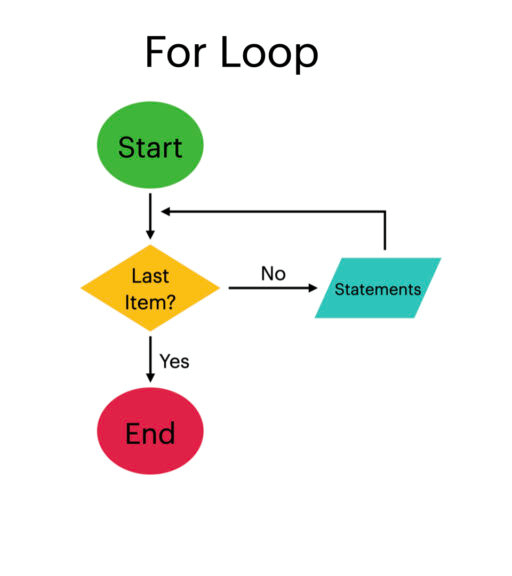
Understanding the For Loop
Think of a for loop as a way to automate repetitive tasks. It’s like having a set of instructions that you want to follow for a known number of times, making it perfect for tasks like iterating through arrays or processing data.
Syntax of the For Loop
The basic structure of a for loop looks like this:
for (initialization; condition; increment/decrement) {
// Code to execute in each iteration
}Code language: JavaScript (javascript)Here’s what each part does:
initialization: This is where you set up the loop, typically by initializing a variable that acts as a counter.condition: This is the test that’s evaluated before each iteration. If the condition is true, the code block inside the loop gets executed.increment/decrement: This is how you modify the counter variable in each iteration. It can be an increment (e.g.,i++to increase the variable by 1) or a decrement (e.g.,i--to decrease the variable by 1).
How a For Loop Works
- The for loop begins by executing the
initializationpart, which sets up the loop. This often involves initializing a counter variable to a specific value. - Next, the loop evaluates the
condition. If the condition is true, the code block inside the loop is executed. - After the code block executes, the
increment/decrementpart is executed, modifying the counter variable. - The loop then returns to the
conditionto check if it’s still true. If it is, the process repeats until the condition becomes false. - Once the condition is false, the loop exits, and your program continues with the next task.
Common Use Cases
For loops are incredibly versatile and find use in various scenarios:
- Iterating Through Arrays: You can use a for loop to go through all the elements in an array one by one.
- Generating Sequences: When you need to generate a sequence of numbers or characters, a for loop is an excellent choice.
- Data Processing: For loops are often used for processing data in bulk, such as calculating statistics or transforming data.
Practical Example
Let’s look at a simple example where we use a for loop to print numbers from 1 to 5:
for (let i = 1; i <= 5; i++) {
  console.log(i);
}Code language: JavaScript (javascript)
In this example, the for keyword sets up the loop, let i = 1 initializes the counter variable i, i <= 5 is the condition that keeps the loop running, and i++ increments i by 1 after each iteration.
Conclusion
The for loop is an essential construct in JavaScript that empowers you to automate repetitive tasks with precision. By setting up the initialization, condition, and increment/decrement, you can control how many times a block of code is executed. This makes it an indispensable tool for building dynamic and efficient applications.
Related posts:

Powered by YARPP.