useLayoutEffect Hook – React
Introduction
In the realm of web development, creating responsive and efficient user interfaces is paramount. React, a widely used JavaScript library for building user interfaces, offers a variety of tools and hooks to help achieve this goal. One such hook is the useLayoutEffect hook, which allows developers to perform actions immediately after the browser layout has been updated, ensuring synchronization between the virtual DOM and the actual DOM. we’ll explore the useLayoutEffect hook in detail, understand its use cases, and provide practical examples of how it can be harnessed to create synchronized and responsive React applications.
Understanding the useLayoutEffect Hook
The useLayoutEffect hook in React is similar to the useEffect hook, with a key difference: it runs synchronously immediately after React has performed all DOM mutations and the browser has updated the layout. This makes it a powerful tool for tasks that require precise synchronization between the virtual DOM and the actual DOM.
Core Concepts
1. Synchronous Execution
Unlike the useEffect hook, which runs asynchronously after the browser paints, useLayoutEffect runs synchronously, blocking the browser while it executes. This synchronous behavior is crucial when precise synchronization is needed.
2. Ensuring the Latest DOM Snapshot
useLayoutEffect guarantees that the DOM has been updated and provides access to the most recent DOM snapshot. This is essential for operations that depend on the current state of the DOM.
3. Dependency Array
Similar to useEffect, useLayoutEffect can accept a dependency array as its second argument. When dependencies change, the hook is re-executed, ensuring the synchronization logic stays up-to-date.
Use Cases
Let’s explore some practical use cases for the useLayoutEffect hook.
1. Precise Measurements
When you need to measure DOM elements or retrieve their precise dimensions, useLayoutEffect is the ideal choice. For instance, you can measure the height and width of an element immediately after it’s updated.
import React, { useLayoutEffect, useRef, useState } from 'react';
function MeasureElement() {
const elementRef = useRef(null);
const [dimensions, setDimensions] = useState({ width: 0, height: 0 });
useLayoutEffect(() => {
const element = elementRef.current;
if (element) {
const { width, height } = element.getBoundingClientRect();
setDimensions({ width, height });
}
}, []);
return (
<div ref={elementRef}>
<p>Width: {dimensions.width}px</p>
<p>Height: {dimensions.height}px</p>
</div>
);
}Code language: HTML, XML (xml)Output :
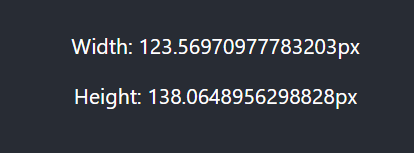
In this example, useLayoutEffect synchronously measures the dimensions of the DOM element, ensuring that the latest dimensions are reflected in the UI.
2. Animations and Transitions
When creating animations or transitions that rely on the precise state of the DOM, useLayoutEffect is indispensable. It allows you to update the DOM and then immediately animate or transition based on the updated state.
import React, { useLayoutEffect, useState } from 'react';

function AnimatedElement() {
  const [isVisible, setIsVisible] = useState(false);

  useLayoutEffect(() => {
    setIsVisible(true);
  }, []);

  return (
    <div className={isVisible ? 'animate' : ''}>
      Content to animate
    </div>
  );
}Code language: HTML, XML (xml)
Output :
Here, useLayoutEffect synchronously triggers the animation by updating the isVisible state, ensuring a smooth transition.
Development Issue
While useLayoutEffect is a powerful tool, it’s essential to use it judiciously and be aware of potential issues:
1. Blocking the Browser
Due to its synchronous execution, useLayoutEffect can block the browser, leading to a less responsive user interface. Avoid long-running or heavy computations within the hook.
2. Not Always Necessary
In many cases, useEffect may be sufficient, and the synchronous behavior of useLayoutEffect may not be needed. Use it when precise synchronization is essential.
Conclusion
The useLayoutEffect hook in React is a valuable tool for tasks that require precise synchronization between the virtual DOM and the actual DOM. By understanding its core concepts and practical use cases, you can use it effectively to create synchronized, responsive, and visually appealing React applications.
Having useLayoutEffect in your toolkit, you can synchronize animations, measurements, and transitions with the most up-to-date DOM state, delivering users a smooth and enjoyable experience. It’s a powerful tool for those situations where precision matters, and it can elevate the quality of your React applications.
Related posts:

Powered by YARPP.